
 Multisensor scene · 2D / 3D association
01

Complex scenario coverage
Look beyond everyday roads to low light, occlusion, roadworks and mixed traffic.
Use a scenario matrix to define coverage, gaps and additional collection needs.

AUTOMOTIVE DATA SOLUTIONS
Automotive data solutions
Connect collection, annotation and quality review, from scenario definition to batch delivery. Organize inspectable, iterative data for camera, video, LiDAR and fusion tasks.
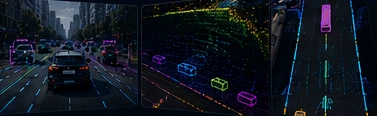
MULTISENSOR ASSOCIATION VIEW
CONSISTENT TASK STANDARDSShared scene, identity and timing conventions connect multimodal production with reviewable, traceable batches.
BUILT FOR PERCEPTION
Define what the model needs to recognize and where it will operate, then translate those needs into collection and annotation rules.
Look beyond everyday roads to low light, occlusion, roadworks and mixed traffic.
Views, frames and sensors need shared conventions.
As volume grows, data origins and rule versions must stay clear.
SENSOR WORKFLOWS
Choose a modality to inspect inputs, tasks and deliverables. Specific formats and acceptance criteria are agreed during the pilot.
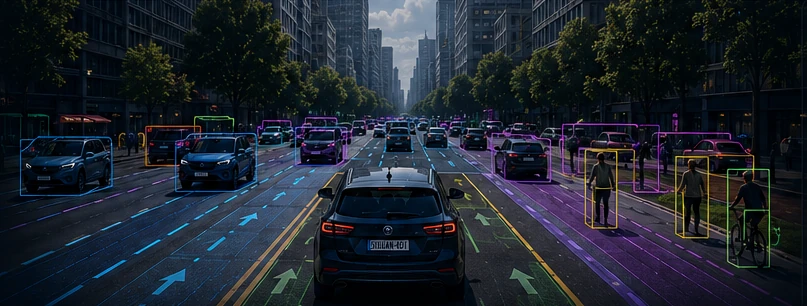
CAMERA
Organize objects, lanes and drivable areas into consistent training labels for front and surround-view perception.
SCENARIO COVERAGE
Allocate 1,200 synchronized keyframe groups across intersections, night scenes, roadworks and mixed traffic, balancing common tasks with edge cases.
Cross traffic, turning vehicles and pedestrian crossings
Check class and track consistency where pedestrians and cyclists interact.
Low light, headlight glare and lighting transitions
Define visible boundaries and rules for uncertain observations.
Cones, temporary lanes and nonstandard road edges
Define temporary traffic elements and changes to drivable areas.
Close occlusion, two-wheelers and dense objects
Review small objects, partial occlusion and identity recovery across frames.
Adjust coverage, allocation and edge-case definitions to the model task, then review gaps in each batch.
CONNECTED DELIVERY
Carry the same task definition through every stage so collection, annotation and quality review use consistent criteria.
Agree on scenarios, modalities, synchronization and metadata; check sample completeness.
Use a small batch with edge cases to align classes, geometry, tracks and associations.
Work in batches, checking edge cases, associations and consistency; record issues and revisions.
Match manifests to versions and review package structure; carry feedback into subsequent batches.
CUSTOMER CASE
Twelve sequences connect scenario coverage, sensor associations and batch delivery in a consistent urban-road perception dataset.
BATCH DELIVERY STRUCTURE
Use the batch index to connect sequences, scenes, synchronized keyframe groups and sensors, making file scope and versions easier to verify.
RELATED SERVICES
QUESTIONS & ANSWERS
Yes, the scope can focus on existing data. Start with de-identified samples, data structures, class rules and output formats, then assess missing metadata and conventions.
Prepare synchronized samples, timestamp definitions, coordinate systems, camera calibration and calibration versions. Validate associations and review methods on a pilot before defining production.
Build a scenario list around roads, lighting, weather, road users and key events. Compare it with project data to identify gaps, then assess additional collection or annotation. Refine scene allocation using project feedback.
Model performance depends on algorithms, training, data distribution and evaluation conditions. We align delivery to agreed coverage and annotation quality, using a pilot to calibrate requirements.
Use the manifest to parse directories, link sequences and check versions. Training requires the matching source data and labels; field definitions and references are aligned during the pilot.
START WITH YOUR SCENARIO
Describe your scenarios, modalities and current stage so we can align task boundaries and sample requirements.
